The Device Pairing Tool in Logitech G HUB allows you to pair replacement USB receivers with your mouse or keyboard. You may also use this tool to pair your mouse with Logitech POWERPLAY.
The Device Pairing Tool will allow you to select the receiver and the device you want to pair it with. The receiver selected will determine what devices can be paired with it. The compatible devices that can be paired with the selected receiver will be shown afterward.
You may need to update the firmware on your device before using the Device Pairing Tool. Please follow any on-screen instructions you receive if G HUB informs you that your device firmware is out-of-date.
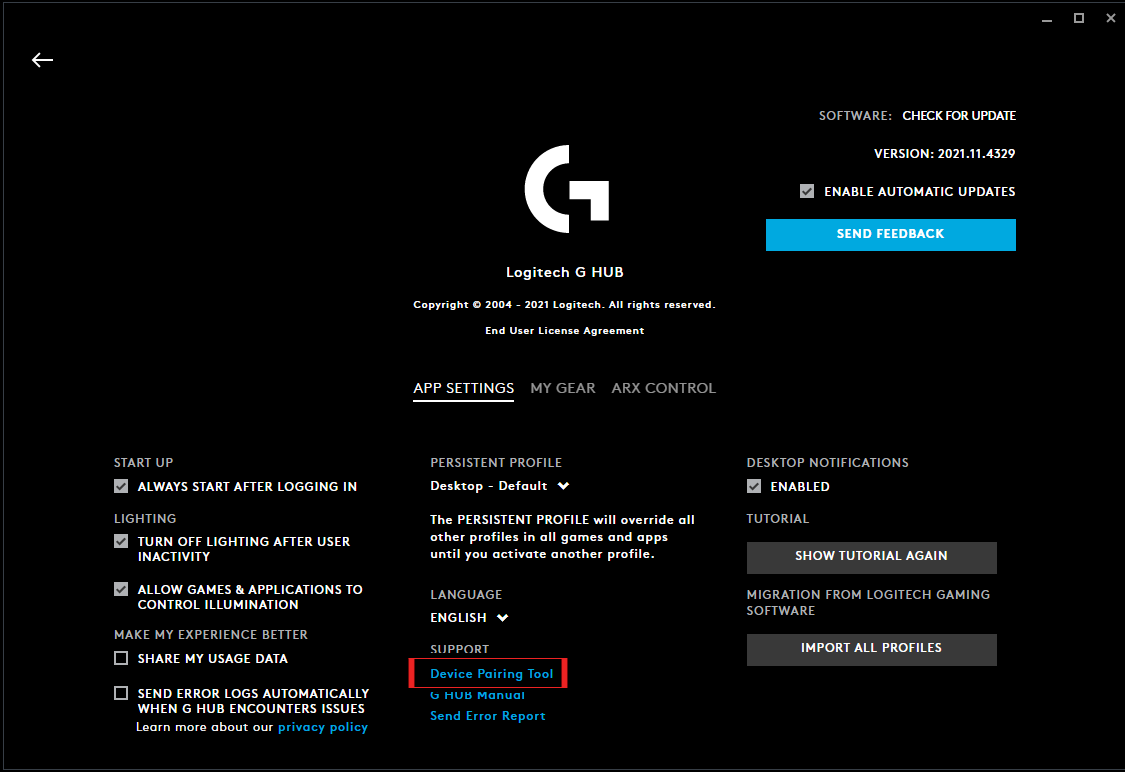
To get to the Device Pairing Tool, follow the steps below.
- Launch Logitech G HUB
- Go into G HUB SETTINGS by clicking the gear icon in the right-hand corner
-
Under SUPPORT, click on Device Pairing Tool to launch the new tool
-
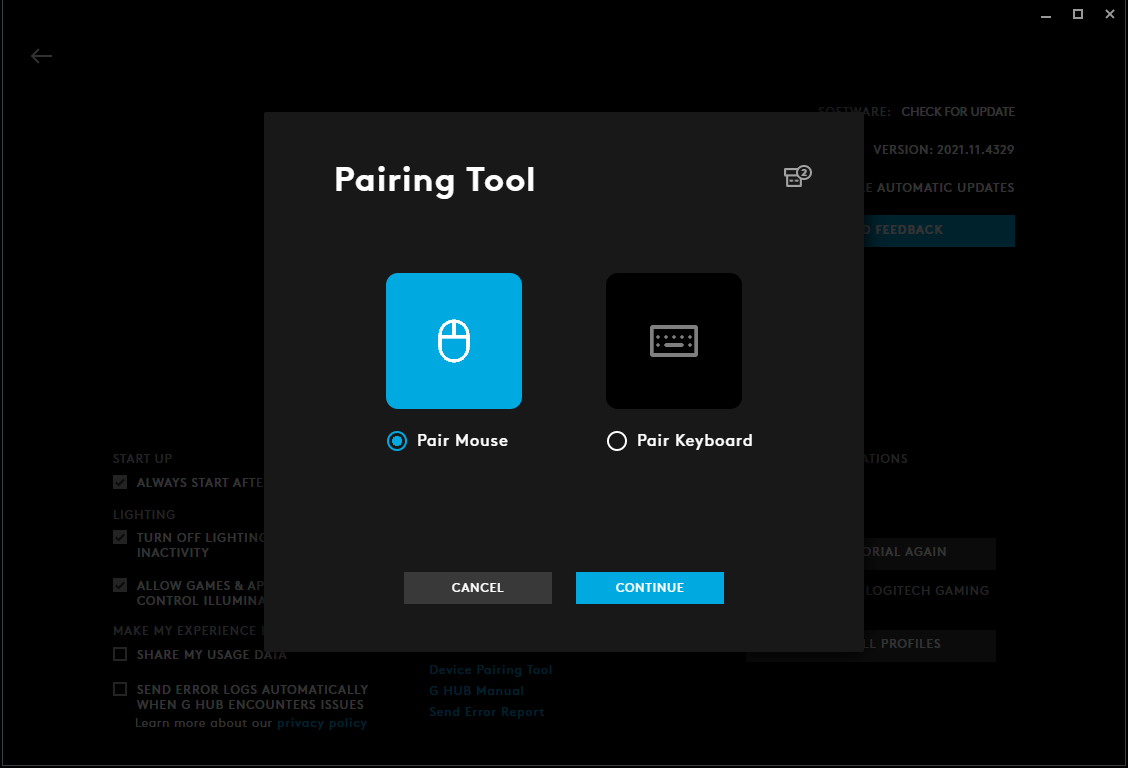
The Device Pairing Tool will launch and allow you to either pair mouse or keyboard. Please select the type of device you want to pair and follow the on-screen instructions.
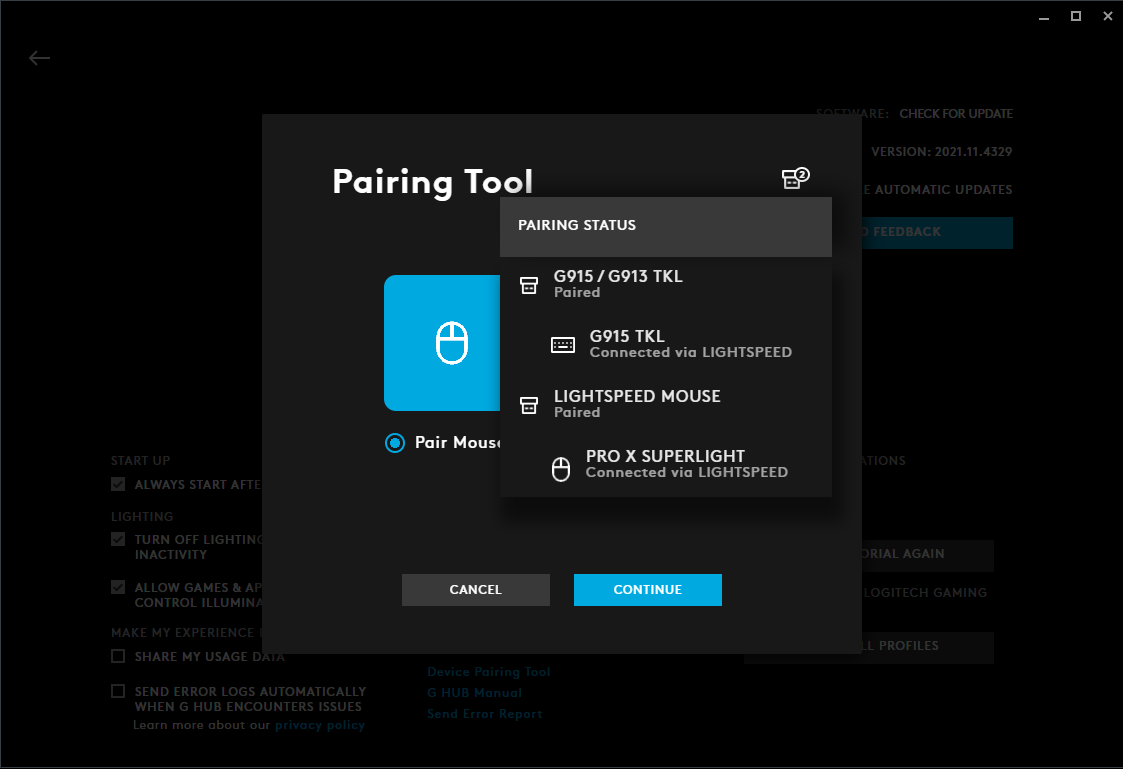
Please note that you can also see your plugged-in receivers’ status by hovering over the receiver icon in the right-hand corner. This will indicate what receivers are already paired and which ones are unpaired.
Aviso importante: Logitech ya no ofrece asistencia ni mantenimiento para Firmware Update Tool. Recomendamos encarecidamente el uso de Logi Options+ para los dispositivos Logitech compatibles. Estamos aquí para ayudarte durante esta transición.
Aviso importante: Logitech ya no ofrece asistencia ni mantenimiento para Logitech Preference Manager. Recomendamos encarecidamente el uso de Logi Options+ para los dispositivos Logitech compatibles. Estamos aquí para ayudarte durante esta transición.
Aviso importante: Logitech ya no ofrece asistencia ni mantenimiento para Logitech Control Center. Recomendamos encarecidamente el uso de Logi Options+ para los dispositivos Logitech compatibles. Estamos aquí para ayudarte durante esta transición.
Aviso importante: Logitech ya no ofrece asistencia ni mantenimiento para Logitech Connection Utility. Recomendamos encarecidamente el uso de Logi Options+ para los dispositivos Logitech compatibles. Estamos aquí para ayudarte durante esta transición.
Aviso importante: Logitech ya no ofrece asistencia ni mantenimiento para el software Unifying. Recomendamos encarecidamente el uso de Logi Options+ para los dispositivos Logitech compatibles. Estamos aquí para ayudarte durante esta transición.
Aviso importante: Logitech ya no ofrece asistencia ni mantenimiento para el software SetPoint. Recomendamos encarecidamente el uso de Logi Options+ para los dispositivos Logitech compatibles. Estamos aquí para ayudarte durante esta transición.
Preguntas más frecuentes
No hay productos disponibles para esta sección
No hay descargas para este producto
No hay descargas para esta versión.
Compatible Product
