In DirectInput mode, you can program the mouselook functionality to a thumbstick. Here's how:
NOTE: See Knowledge Base article 360023236454 for more information about input modes.
-
Create a new game profile. For instructions, see Knowledge Base article 360023236454
-
Go to Start > Programs > Logitech > Logitech Gaming Software.
-
Go to Profile > Edit… and choose your new game profile.
-
Select the thumbstick you want to assign the mouselook function to. Most people use the right thumbstick.
-
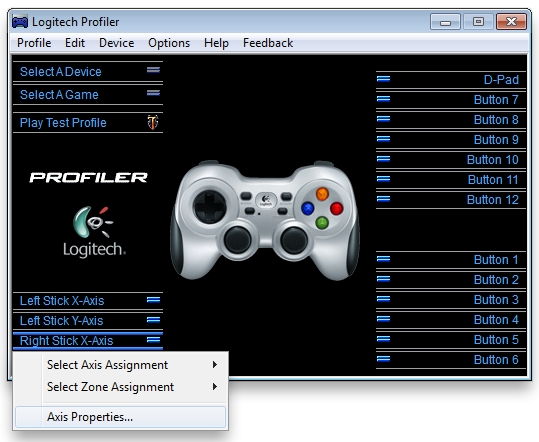
Choose Right Stick X-Axis > Axis Properties, as shown below.
-
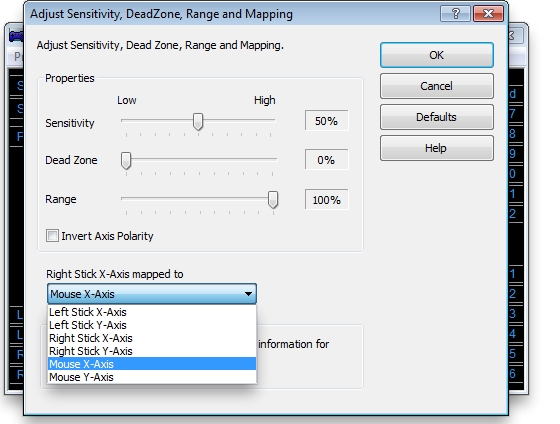
In the new window that opens (shown below), select "Mouse X-Axis" and click OK.
-
Repeat steps 5 - 6, but select Left Stick Y-Axis > Axis Properties.
-
Choose "Mouse Y-Axis" and click OK. Your mouselook function should now be mapped to your right thumbstick.
Contact information
If the above solutions do not resolve the issue, please see Knowledge Base article 21368 for instructions on contacting Logitech Technical Support.
Important Notice: The Firmware Update Tool is no longer supported or maintained by Logitech. We highly recommend using Logi Options+ for your supported Logitech devices. We are here to assist you during this transition.
Important Notice: The Logitech Preference Manager is no longer supported or maintained by Logitech. We highly recommend using Logi Options+ for your supported Logitech devices. We are here to assist you during this transition.
Important Notice: The Logitech Control Center is no longer supported or maintained by Logitech. We highly recommend using Logi Options+ for your supported Logitech devices. We are here to assist you during this transition.
Important Notice: The Logitech Connection Utility is no longer supported or maintained by Logitech. We highly recommend using Logi Options+ for your supported Logitech devices. We are here to assist you during this transition.
Important Notice: The Unifying Software is no longer supported or maintained by Logitech. We highly recommend using Logi Options+ for your supported Logitech devices. We are here to assist you during this transition.
Important Notice: The SetPoint software is no longer supported or maintained by Logitech. We highly recommend using Logi Options+ for your supported Logitech devices. We are here to assist you during this transition.
Frequently Asked Questions
There are no products available for this section
There are no Downloads for this Product
There are no Downloads for this Version
Compatible Product
