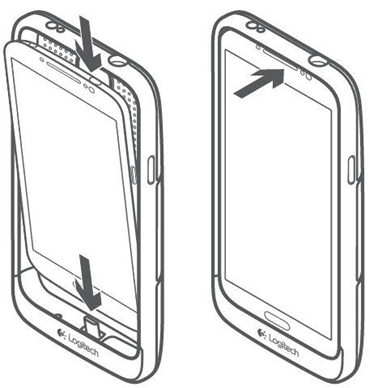
- Open the USB charging cover on your phone and align it with the corresponding channel on the bottom of protection [+] power case.
- Line your phone’s micro USB port to the micro USB adapter in the case while securing the bottom of the phone into protection [+] power.
-
Gently push the top of your phone into the protection [+] power case.
Turning the case on and off
To turn the protection [+] case:
- On — Press the button on the back of protection [+] power (while coupled with your phone). You can turn the protection [+] power on whether or not your phone has a charge.
- Off — Press the button on the back of protection [+] power for three seconds.
Removing the protection [+] power from your phone
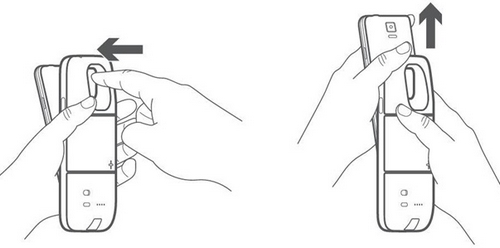
- Press gently through the camera hole until the top of the phone is released from the case.
-
Slide the phone upward to uncouple the Lightning adapter.
Important Notice: The Firmware Update Tool is no longer supported or maintained by Logitech. We highly recommend using Logi Options+ for your supported Logitech devices. We are here to assist you during this transition.
Important Notice: The Logitech Preference Manager is no longer supported or maintained by Logitech. We highly recommend using Logi Options+ for your supported Logitech devices. We are here to assist you during this transition.
Important Notice: The Logitech Control Center is no longer supported or maintained by Logitech. We highly recommend using Logi Options+ for your supported Logitech devices. We are here to assist you during this transition.
Important Notice: The Logitech Connection Utility is no longer supported or maintained by Logitech. We highly recommend using Logi Options+ for your supported Logitech devices. We are here to assist you during this transition.
Important Notice: The Unifying Software is no longer supported or maintained by Logitech. We highly recommend using Logi Options+ for your supported Logitech devices. We are here to assist you during this transition.
Important Notice: The SetPoint software is no longer supported or maintained by Logitech. We highly recommend using Logi Options+ for your supported Logitech devices. We are here to assist you during this transition.
Frequently Asked Questions
There are no products available for this section
There are no Downloads for this Product
There are no Downloads for this Version
Compatible Product
