Do the following steps to stop the Logitech QuickCam software from getting loaded in your startup items:
-
Click on Start:

-
Click on Run:

-
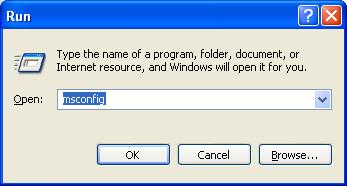
Type msconfig and click OK:
-
The System Configuration Utility screen will appear.
-
Click on the Startup Tab and look for the two entries ‘Quickcam’ and ‘Communications_Helper’ as shown below:

-
Remove the checkmark beside each of these entries by clicking on the checkboxes beside each entry:

-
Click Apply then OK as shown below:

-
Click Restart on the System Configuration Screen:

-
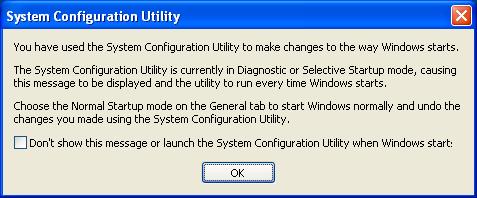
After restarting your computer you will see the System Configuration Utility screen:
-
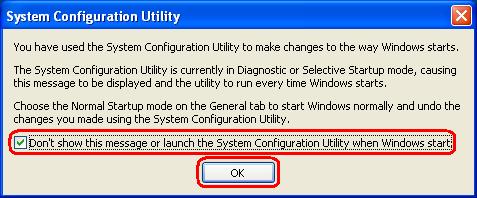
Place a check mark where it says “Don’t show this message or launch the System Configuration Utility when Windows Start” so next time you start your computer you will not this screen again.
Important Notice: The Firmware Update Tool is no longer supported or maintained by Logitech. We highly recommend using Logi Options+ for your supported Logitech devices. We are here to assist you during this transition.
Important Notice: The Logitech Preference Manager is no longer supported or maintained by Logitech. We highly recommend using Logi Options+ for your supported Logitech devices. We are here to assist you during this transition.
Important Notice: The Logitech Control Center is no longer supported or maintained by Logitech. We highly recommend using Logi Options+ for your supported Logitech devices. We are here to assist you during this transition.
Important Notice: The Logitech Connection Utility is no longer supported or maintained by Logitech. We highly recommend using Logi Options+ for your supported Logitech devices. We are here to assist you during this transition.
Important Notice: The Unifying Software is no longer supported or maintained by Logitech. We highly recommend using Logi Options+ for your supported Logitech devices. We are here to assist you during this transition.
Important Notice: The SetPoint software is no longer supported or maintained by Logitech. We highly recommend using Logi Options+ for your supported Logitech devices. We are here to assist you during this transition.
Frequently Asked Questions
There are no products available for this section
There are no Downloads for this Product
There are no Downloads for this Version
Compatible Product
