Your K750 keyboard ships with the Logitech Unifying USB receiver shown below
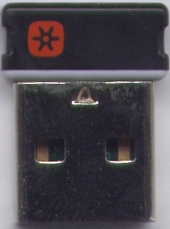
You can only connect your K750 keyboard with Unifying USB receivers, which you can tell by the Unifying logo printed on them 
Before connecting the K750 to the Unifying receiver, check the battery level by pressing the Check-Light hotkey (shown below), located above the numpad near the ON/OFF switch.
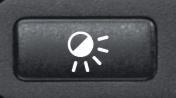
If you see a:
-
Green light
Follow the reconnect process given in Knowledge Base article 360023236494.

-
Red light
Charge the battery until the green light comes on before reconnecting the keyboard.

Important Notice: The Firmware Update Tool is no longer supported or maintained by Logitech. We highly recommend using Logi Options+ for your supported Logitech devices. We are here to assist you during this transition.
Important Notice: The Logitech Preference Manager is no longer supported or maintained by Logitech. We highly recommend using Logi Options+ for your supported Logitech devices. We are here to assist you during this transition.
Important Notice: The Logitech Control Center is no longer supported or maintained by Logitech. We highly recommend using Logi Options+ for your supported Logitech devices. We are here to assist you during this transition.
Important Notice: The Logitech Connection Utility is no longer supported or maintained by Logitech. We highly recommend using Logi Options+ for your supported Logitech devices. We are here to assist you during this transition.
Important Notice: The Unifying Software is no longer supported or maintained by Logitech. We highly recommend using Logi Options+ for your supported Logitech devices. We are here to assist you during this transition.
Important Notice: The SetPoint software is no longer supported or maintained by Logitech. We highly recommend using Logi Options+ for your supported Logitech devices. We are here to assist you during this transition.
Frequently Asked Questions
There are no products available for this section
There are no Downloads for this Product
There are no Downloads for this Version
Compatible Product
